Note
Go to the end to download the full example code or to run this example in your browser via JupyterLite or Binder.
Nearest Centroid Classification#
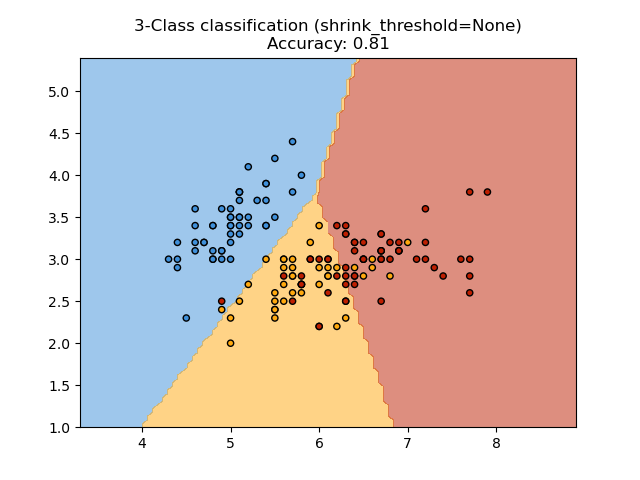
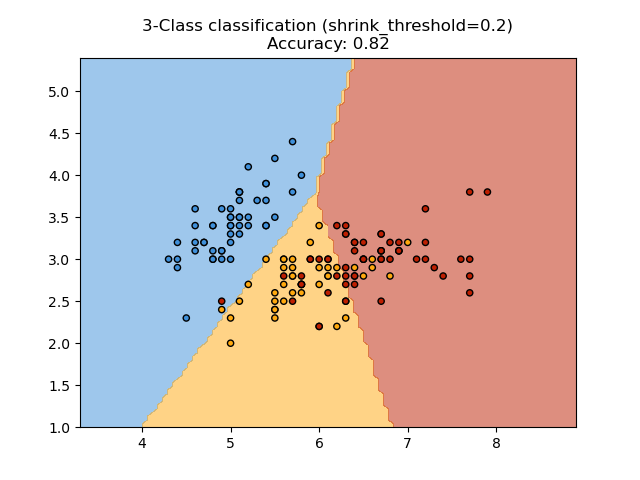
Sample usage of the Nearest Centroid Classifier with different shrink thresholds. It will plot the decision boundaries for each class.
# Authors: The scikit-learn developers
# SPDX-License-Identifier: BSD-3-Clause
import matplotlib.pyplot as plt
import numpy as np
from matplotlib.colors import ListedColormap

from sklearn import datasets
from sklearn.inspection import DecisionBoundaryDisplay
from sklearn.neighbors import NearestCentroid

# import some data to play with
iris = datasets.load_iris()
# we only take the first two features. We could avoid this ugly
# slicing by using a two-dim dataset
X = iris.data[:, :2]
y = iris.target

for shrinkage in [None, 0.2]:
    # we create an instance of Nearest Centroid Classifier and fit the data.
    clf = NearestCentroid(shrink_threshold=shrinkage)
    clf.fit(X, y)
    y_pred = clf.predict(X)
    acc = np.mean(y == y_pred)

    _, ax = plt.subplots()
    disp = DecisionBoundaryDisplay.from_estimator(
        clf, X, ax=ax, response_method="predict", alpha=0.5
    )

    # Plot also the training points
    cmap = ListedColormap(disp.target_colors_)
    plt.scatter(X[:, 0], X[:, 1], c=y, cmap=cmap, edgecolor="k", s=20)
    plt.title(
        f"3-Class classification (shrink_threshold={shrinkage})\nAccuracy: {acc:.2f}"
    )
    plt.axis("tight")

plt.show()
Total running time of the script: (0 minutes 0.070 seconds)


Related examples
Plot the decision surface of decision trees trained on the iris dataset
Plot the decision surface of decision trees trained on the iris dataset
Comparing Nearest Neighbors with and without Neighborhood Components Analysis
Comparing Nearest Neighbors with and without Neighborhood Components Analysis