
Note
Go to the end to download the full example code or to run this example in your browser via JupyterLite or Binder.
Release Highlights for scikit-learn 1.9#
We are pleased to announce the release of scikit-learn 1.9! Many bug fixes and improvements were added, as well as some key new features. Below we detail the highlights of this release. For an exhaustive list of all the changes, please refer to the release notes.
To install the latest version (with pip):
pip install --upgrade scikit-learn
or with conda:
conda install -c conda-forge scikit-learn
Callbacks#
This release introduces experimental support for callbacks in scikit-learn. They
are objects that can be registered on estimators, through the set_callbacks method,
to be invoked at the beginning and end of key steps during fit. See the
user guide for more details. Only a few estimators support
callbacks for now, see the
list of supported estimators.
Two built-in callbacks are provided in this release:
ProgressBar, to display progress bars.ScoringMonitor, to compute and log scoring metrics.
from sklearn.callback import ProgressBar, ScoringMonitor
from sklearn.datasets import make_classification
from sklearn.linear_model import LogisticRegression

X, y = make_classification(
    n_samples=1000, n_features=50, n_classes=10, n_informative=20, random_state=0
)

scoring_monitor = ScoringMonitor(scoring="d2_log_loss_score")
logreg = LogisticRegression(solver="lbfgs")
logreg.set_callbacks(scoring_monitor, ProgressBar())
logreg.fit(X, y)

log = scoring_monitor.get_logs().data_as_pandas
log[["task_name", "task_id", "d2_log_loss_score"]]
LogisticRegression - fit ━━━━━━━━━━━━━━━━━━━━━━━━━━━━━━━━━━━━━━ 100% 0:00:00.094
Progress bars can also be displayed for compositions of estimators.
from sklearn.callback import ProgressBar
from sklearn.datasets import load_iris
from sklearn.linear_model import LogisticRegression
from sklearn.model_selection import GridSearchCV

X, y = load_iris(return_X_y=True)
logreg = LogisticRegression(solver="lbfgs")
grid_search = GridSearchCV(logreg, {"C": [10, 1, 0.1]}, n_jobs=2)
grid_search.set_callbacks(ProgressBar())
grid_search.fit(X, y)
Intermediate output. Note that two sub-tasks progress concurrently because we
set n_jobs=2:
GridSearchCV - fit                                                          ━━━━━━╸                                   17% 0:00:02
  GridSearchCV - search #0                                                  ━━━━━━━━━━━━━╸                            34% 0:00:01
    GridSearchCV - candidate-split-evaluation | LogisticRegression - fit #1 ━━━━━━━━━━━━━━━━━━━━━━━━━━━━━━━━━━━━━━━━ 100% 0:00:00
    GridSearchCV - candidate-split-evaluation | LogisticRegression - fit #0 ━━━━━━━━━━━━━━━━━━━━━━━━━━━━━━━━━━━━━━━━ 100% 0:00:00
    GridSearchCV - candidate-split-evaluation | LogisticRegression - fit #2 ━━━━━━━━━━━━━━━━━━━━━━━━━━━━━━━━━━━━━━━━ 100% 0:00:00
    GridSearchCV - candidate-split-evaluation | LogisticRegression - fit #3 ━━━━━━━━━━━━━━━━━━━━━━━━━━━━━━━━━━━━━━━━ 100% 0:00:00
    GridSearchCV - candidate-split-evaluation | LogisticRegression - fit #4 ━━━━━━━━━━━━━━━━━━━━━╸                    54% 0:00:01
    GridSearchCV - candidate-split-evaluation | LogisticRegression - fit #5 ━━━━━━━━━━━━━━━━━                         44% 0:00:01
Final output displaying all the completed nested subtasks:
GridSearchCV - fit                                                           ━━━━━━━━━━━━━━━━━━━━━━━━━━━━━━━━━━━━━━━━ 100% 0:00:00
  GridSearchCV - search #0                                                   ━━━━━━━━━━━━━━━━━━━━━━━━━━━━━━━━━━━━━━━━ 100% 0:00:00
    GridSearchCV - candidate-split-evaluation | LogisticRegression - fit #1  ━━━━━━━━━━━━━━━━━━━━━━━━━━━━━━━━━━━━━━━━ 100% 0:00:00
    GridSearchCV - candidate-split-evaluation | LogisticRegression - fit #0  ━━━━━━━━━━━━━━━━━━━━━━━━━━━━━━━━━━━━━━━━ 100% 0:00:00
    GridSearchCV - candidate-split-evaluation | LogisticRegression - fit #2  ━━━━━━━━━━━━━━━━━━━━━━━━━━━━━━━━━━━━━━━━ 100% 0:00:00
    GridSearchCV - candidate-split-evaluation | LogisticRegression - fit #3  ━━━━━━━━━━━━━━━━━━━━━━━━━━━━━━━━━━━━━━━━ 100% 0:00:00
    GridSearchCV - candidate-split-evaluation | LogisticRegression - fit #4  ━━━━━━━━━━━━━━━━━━━━━━━━━━━━━━━━━━━━━━━━ 100% 0:00:00
    GridSearchCV - candidate-split-evaluation | LogisticRegression - fit #5  ━━━━━━━━━━━━━━━━━━━━━━━━━━━━━━━━━━━━━━━━ 100% 0:00:00
    GridSearchCV - candidate-split-evaluation | LogisticRegression - fit #6  ━━━━━━━━━━━━━━━━━━━━━━━━━━━━━━━━━━━━━━━━ 100% 0:00:00
    GridSearchCV - candidate-split-evaluation | LogisticRegression - fit #7  ━━━━━━━━━━━━━━━━━━━━━━━━━━━━━━━━━━━━━━━━ 100% 0:00:00
    GridSearchCV - candidate-split-evaluation | LogisticRegression - fit #8  ━━━━━━━━━━━━━━━━━━━━━━━━━━━━━━━━━━━━━━━━ 100% 0:00:00
    GridSearchCV - candidate-split-evaluation | LogisticRegression - fit #9  ━━━━━━━━━━━━━━━━━━━━━━━━━━━━━━━━━━━━━━━━ 100% 0:00:00
    GridSearchCV - candidate-split-evaluation | LogisticRegression - fit #10 ━━━━━━━━━━━━━━━━━━━━━━━━━━━━━━━━━━━━━━━━ 100% 0:00:00
    GridSearchCV - candidate-split-evaluation | LogisticRegression - fit #11 ━━━━━━━━━━━━━━━━━━━━━━━━━━━━━━━━━━━━━━━━ 100% 0:00:00
    GridSearchCV - candidate-split-evaluation | LogisticRegression - fit #12 ━━━━━━━━━━━━━━━━━━━━━━━━━━━━━━━━━━━━━━━━ 100% 0:00:00
    GridSearchCV - candidate-split-evaluation | LogisticRegression - fit #13 ━━━━━━━━━━━━━━━━━━━━━━━━━━━━━━━━━━━━━━━━ 100% 0:00:00
    GridSearchCV - candidate-split-evaluation | LogisticRegression - fit #14 ━━━━━━━━━━━━━━━━━━━━━━━━━━━━━━━━━━━━━━━━ 100% 0:00:00
  GridSearchCV - refit-with-best-params | LogisticRegression - fit #1        ━━━━━━━━━━━━━━━━━━━━━━━━━━━━━━━━━━━━━━━━ 100% 0:00:00
There is also a public API to implement callback support in third-party estimators and to implement custom callbacks. See the developer’s guide for more details.
New callbacks and callback support in more estimators will be added in future releases. The callback API is experimental and may evolve without deprecation.
Improvements to the HTML representation of estimators#
The HTML representation of estimators now includes information made available after fit. There is a new “Fitted attributes” table that lists the fitted attributes and their type and values. In addition, the HTML representation of transformers includes new visual blocks showing the number and names of the output features.
Expand the diagram below by clicking on the different visual blocks to see the new features.
import pandas as pd

from sklearn.compose import make_column_transformer
from sklearn.linear_model import LogisticRegression
from sklearn.pipeline import make_pipeline
from sklearn.preprocessing import OneHotEncoder, StandardScaler

X = pd.DataFrame({"num": [0.1, 0.2, 0.3, 0.4], "cat": ["A", "C", "B", "C"]})
y = [1, 3, 1, 2]

pipe = make_pipeline(
    make_column_transformer((StandardScaler(), ["num"]), (OneHotEncoder(), ["cat"])),
    LogisticRegression(),
)
pipe.fit(X, y)
Computing metrics across thresholds#
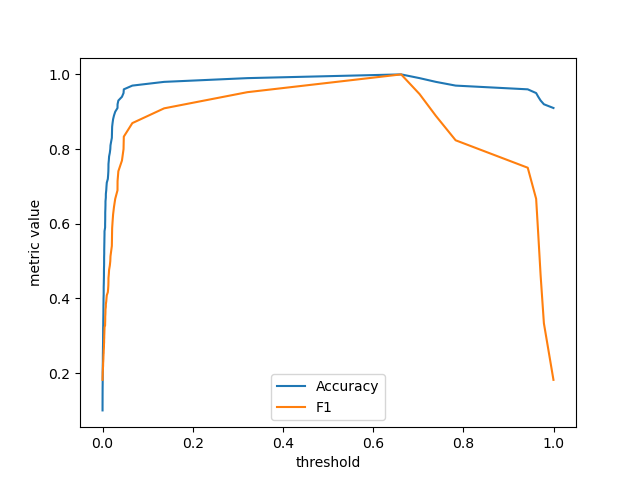
A new function metric_at_thresholds has been added to compute
an arbitrary binary classification metric across all possible decision thresholds.
import matplotlib.pyplot as plt

from sklearn.datasets import make_classification
from sklearn.linear_model import LogisticRegression
from sklearn.metrics import accuracy_score, f1_score, metric_at_thresholds

X, y = make_classification(weights=[0.9, 0.1], random_state=0)
lr = LogisticRegression().fit(X, y)
y_score = lr.predict_proba(X)[:, 1]

accuracy, thresholds = metric_at_thresholds(y, y_score, accuracy_score)
f1, _ = metric_at_thresholds(y, y_score, f1_score)

_, ax = plt.subplots()
ax.plot(thresholds, accuracy, label="Accuracy")
ax.plot(thresholds, f1, label="F1")
ax.set_xlabel("threshold")
ax.set_ylabel("metric value")
ax.legend()
plt.show()
Sparse array configuration#
A new configuration key "sparse_interface" has been added to control the type of
sparse objects produced by functions and estimators. It is now possible to produce
sparse arrays instead of sparse matrices (default).
This continues the effort to prepare for
SciPy’s migration from sparse matrices to sparse arrays.
import sklearn
from sklearn.preprocessing import OneHotEncoder

X = [["fox", "dog", "cat"]]
ohe = OneHotEncoder()

with sklearn.config_context(sparse_interface="sparray"):
    Xt = ohe.fit_transform(X)
Xt
<Compressed Sparse Row sparse array of dtype 'float64'
    with 3 stored elements and shape (1, 3)>
Total running time of the script: (0 minutes 0.436 seconds)


Related examples
Analysis of the convergence of penalized logistic regression models

Custom refit strategy of a grid search with cross-validation